微信小程序中提供了template使用,即相同的板块可以进行代码互用,如下方的效果图,就可以用template。本文主要介绍了微信小程序template模板使用的相关资料,希望通过本文能帮助到大家,让大家理解掌握这样的功能,需要的朋友可以参考下。
微信小程序template模板使用
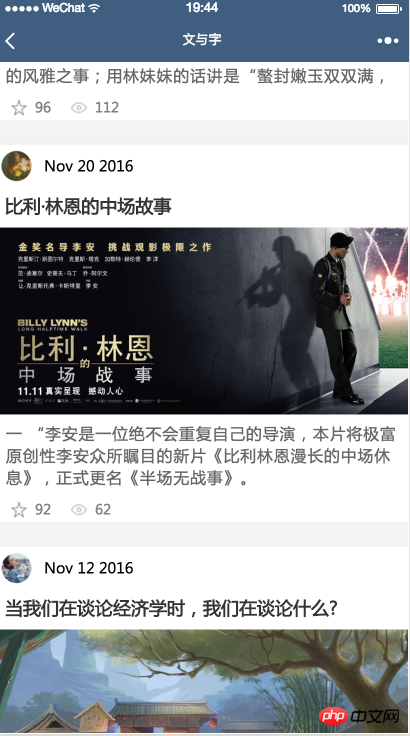
效果图
一、模板定义
模板最重要的是模板的名称,即””
以下是实例模板代码
<template>
 <view>
  <view>
   <image></image>
   <text>{{date}}</text>
  </view>
  <text>{{title}}</text>
  <image></image>
  <text>{{content}}</text>
  <view>
   <image></image>
   <text>{{collection}}</text>
   <image></image>
   <text>{{reading}}</text>
  </view>
 </view></template>
登录后复制
wxss文件
 .post-container {
 display: flex;
 flex-direction: column;
 margin-top: 20rpx;
 margin-bottom: 40rpx;
 background-color: white;
 border-bottom: 1px solid #ededed;
 border-top: 1px solid #ededed;
 padding-bottom: 5px;
}
.post-author-date {
 margin: 10rpx 0 20rpx 10rpx;
}
.post-author {
 width: 60rpx;
 height: 60rpx;
 vertical-align: middle;
}
.post-date {
 margin-left: 20rpx;
 vertical-align: middle;
 margin-bottom: 5px;
 font-size: 26rpx;
}
.post-title {
 font-size: 34rpx;
 font-weight: 600;
 color: #333;
 margin-bottom: 10px;
 margin-left: 10px;
 margin-right: 10px;
}
.post-image {
 margin-left: 16px;
 width: 100%;
 height: 340rpx;
 margin: auto 0;
 margin-bottom: 15rpx;
}
.post-content {
 color: #666;
 font-size: 28rpx;
 margin-bottom: 20rpx;
 margin-left: 20rpx;
 margin-right: 20rpx;
 letter-spacing: 2rpx;
 line-height: 40rpx;
}
.post-like {
 font-size: 13px;
 flex-direction: row;
 line-height: 16px;
 margin-left: 16px;
 color: gray;
}
.post-like-image {
 height: 16px;
 width: 16px;
 margin-right: 8px;
 vertical-align: middle;
}
.post-link-text {
 vertical-align: middle;
 margin-right: 20px;
}
登录后复制
二、模板使用
引入模板文件
使用模板文件 用is 使用 模板定义时的名称 data里面是循环里面里面的数据 用“…”表示的话,就可以把item里面的数据全部平铺出来,这样在template里面就不用写“item.xx”了,直接写item里面的属性就可以了 要使用template的程序wxml文件
<import></import><view>
 <block>
   <template></template>
 </block></view>
登录后复制
wxss 文件
@import 'post-item/post-item-template.wxss';
登录后复制
相关推荐:
以上就是微信小程序template模板详解的详细内容,更多请关注米云其它相关文章!