
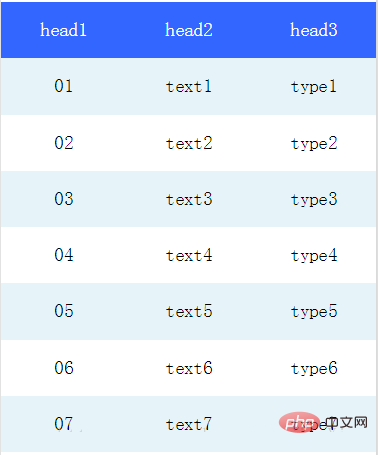
我们可以在微信小程序视图容器view中通过flex布局实现表格样式。
Flex是Flexible Box的缩写,顾名思义为“弹性布局”,用来为盒装模型提供最大的灵活性。
任何一个容器都可以指定为Flex 布局。
table.wxml
<view>
  <view>
    <view>head1</view>
    <view>head2</view>
    <view>head3</view>
  </view>
  <block>
    <view>
      <view>{{item.code}}</view>
      <view>{{item.text}}</view>
      <view>{{item.type}}</view>
    </view>
    <view>
      <view>{{item.code}}</view>
      <view>{{item.text}}</view>
      <view>{{item.type}}</view>
    </view>
  </block></view>
登录后复制
table.wxss
.table {
  border: 0px solid darkgray;
}
.tr {
  display: flex;
  width: 100%;
  justify-content: center;
  height: 3rem;
  align-items: center;
}
.td {
    width:40%;
    justify-content: center;
    text-align: center;
}
.bg-w{
  background: snow;
}
.bg-g{
  background: #E6F3F9;
}
.th {
  width: 40%;
  justify-content: center;
  background: #3366FF;
  color: #fff;
  display: flex;
  height: 3rem;
  align-items: center;
}
登录后复制
table.js
Page({
  data: {
    listData:[
      {"code":"01","text":"text1","type":"type1"},
      {"code":"02","text":"text2","type":"type2"},
      {"code":"03","text":"text3","type":"type3"},
      {"code":"04","text":"text4","type":"type4"},
      {"code":"05","text":"text5","type":"type5"},
      {"code":"06","text":"text6","type":"type6"},
      {"code":"07","text":"text7","type":"type7"}
    ]
  },
  onLoad: function () {
    console.log('onLoad')
  }

})
登录后复制
效果图如下
推荐:《》
以上就是如何在小程序中插入表格的详细内容,更多请关注米云其它相关文章!