1.打开指定文件。
2.找到代码所在位置,一般可通过搜索SHOP BY PRICE,即可找到代码所在位置。
原始代码样式如下:
<a href=”index.php?main_page=advanced_search_result&pfrom=0&pto=2″>Under US$ 2.00</a>
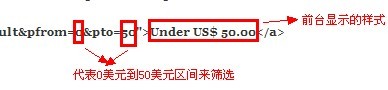
修改举例1,如需将上面的Under US$ 2.00(低于2美元商品筛选)改为Under US$ 50.00(低于50美元商品筛选),代码如下:
<a href=”index.php?main_page=advanced_search_result&pfrom=0&pto=50″>Under US$ 50.00</a>
图解:
修改举例2,比如要将:
<a href=”index.php?main_page=advanced_search_result&pfrom=2&pto=3″>US $ 2.00- US $ 3.00</a>
2美元-3美元区间筛选商品,修改为50美元到100美元区间筛选商品,代码修改如下:
<a href=”index.php?main_page=advanced_search_result&pfrom=50&pto=100″>US $ 50.00- US $ 100.00</a>