
这篇文章主要介绍了微信小程序 label 组件详解及简单实例的相关资料,需要的朋友可以参考下
实现效果图:
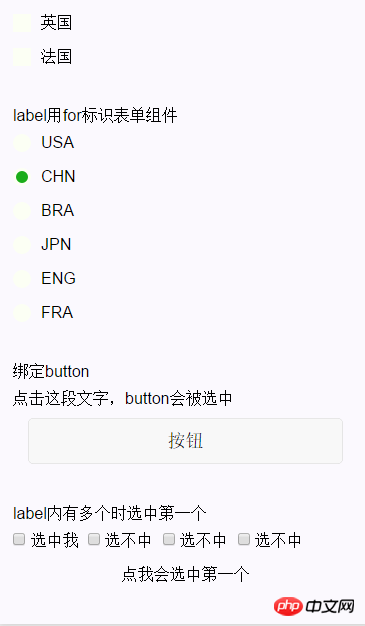
用来改进表单组件的可用性,使用for属性找到对应的id,或者将控件放在该标签下,当点击时,就会触发对应的控件。
for优先级高于内部控件,内部有多个控件的时候默认触发第一个控件。
目前可以绑定的控件有:button, checkbox, radio, switch。
| 属性名 | 类型 | 说明 |
|---|---|---|
| for | String | 绑定控件的id |
示例代码:
<view><view>表单组件在label内</view><checkbox-group>
 <view>
 <label>
  <checkbox></checkbox>
  <view>
  <view></view>
  </view>
  <text>{{item.value}}</text>
 </label>
 </view></checkbox-group></view><view><view>label用for标识表单组件</view><radio-group>
 <view>
 <radio></radio>
 <view>
  <view></view>
 </view>
 <label><text>{{item.name}}</text></label>
 </view></radio-group></view><view><view>绑定button</view><label>
 <text>点击这段文字,button会被选中</text></label>
<view>
 <button>按钮</button>
</view></view><view><view>label内有多个时选中第一个</view><label>
 <checkbox> 选中我 </checkbox>
 <checkbox> 选不中 </checkbox>
 <checkbox> 选不中 </checkbox>
 <checkbox> 选不中 </checkbox>
 <view>点我会选中第一个</view></label>
</view>
登录后复制
Page({
 data: {
 checkboxItems: [
 {name: 'USA', value: '美国'},
 {name: 'CHN', value: '中国', checked: 'true'},
 {name: 'BRA', value: '巴西'},
 {name: 'JPN', value: '日本', checked: 'true'},
 {name: 'ENG', value: '英国'},
 {name: 'TUR', value: '法国'},
 ],
 radioItems: [
 {name: 'USA', value: '美国'},
 {name: 'CHN', value: '中国', checked: 'true'},
 {name: 'BRA', value: '巴西'},
 {name: 'JPN', value: '日本'},
 {name: 'ENG', value: '英国'},
 {name: 'TUR', value: '法国'},
 ],
 hidden: false
 },
 checkboxChange: function(e) {
 var checked = e.detail.value
 var changed = {}
 for (var i = 0; i <p class="jb51code"><br></p><pre class="brush:js;">.label-1, .label-2{
 margin-bottom: 15px;
}
.label-1__text, .label-2__text {
 display: inline-block;
 vertical-align: middle;
}

.label-1__icon {
 position: relative;
 margin-right: 10px;
 display: inline-block;
 vertical-align: middle;
 width: 18px;
 height: 18px;
 background: #fcfff4;
}

.label-1__icon-checked {
 position: absolute;
 top: 3px;
 left: 3px;
 width: 12px;
 height: 12px;
 background: #1aad19;
}


.label-2__icon {
 position: relative;
 display: inline-block;
 vertical-align: middle;
 margin-right: 10px;
 width: 18px;
 height: 18px;
 background: #fcfff4;
 border-radius: 50px;
}

.label-2__icon-checked {
 position: absolute;
 left: 3px;
 top: 3px;
 width: 12px;
 height: 12px;
 background: #1aad19;
 border-radius: 50%;
}

.label-4_text{
 text-align: center;
 margin-top: 15px;
}
登录后复制
相关文章:
以上就是微信小程序label组件详解实例代码的详细内容,更多请关注米云其它相关文章!
