
现在微信小程序越来越火,我们也在持续不断的为大家带来微信小程序相关教程分享,本文我们继续为大家分享微信小程序实现多宫格抽奖功能。
首先看效果:
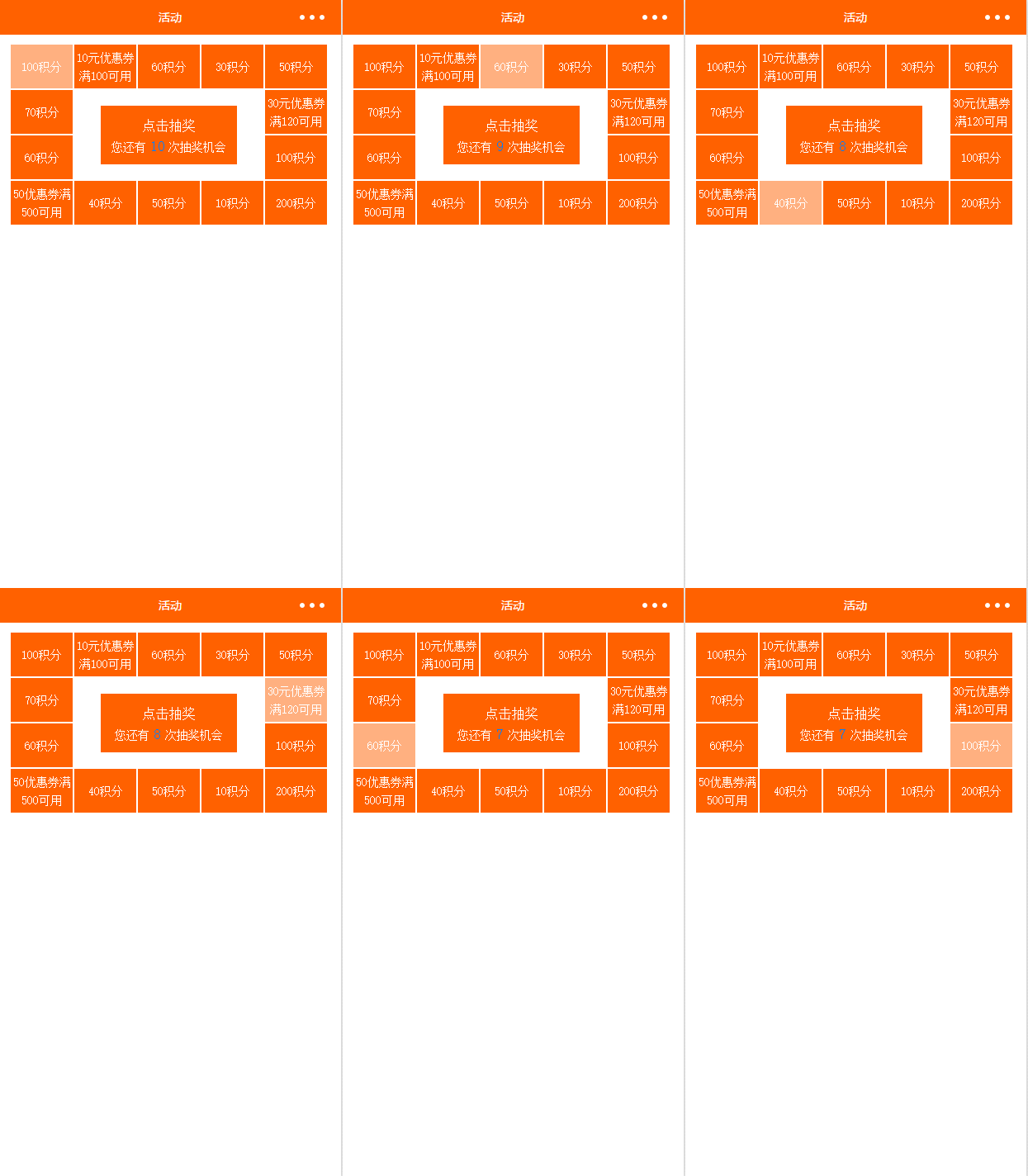
思路是先让其转动2圈多,然后再进行抽奖,格子运动用的是setTimeout,让其运行的时间间隔不一样,然后产生运动快慢的效果
好了,上代码
首先是WXML(这里面的判断可能有些绕,仔细按顺序看,因其第五个和第十一个格子在不同手机屏幕大小上的显示有问题,所以再次给它们判断了一下)
<view>
<view>0&&index3&&index7&&index11&&index
<text>6?"line-height:40rpx;margin-top:10rpx;":"line-height:100rpx;"}}'>{{item.name}}</text>
</view>
<view>
<text>点击抽奖</text>
<text>您还有<text>{{howManyNum}}</text>次抽奖机会</text>
</view></view><view></view>
登录后复制
WXSS:
.box{
 margin:20rpx 25rpx;
 height: 400rpx;
 width: 698rpx;
 /*border:1px solid #ddd;*/
 position: relative;
 /*box-sizing: border-box;*/
}
.boxsub{
 width: 140rpx;
 height: 100rpx;
 /*border: 1px solid #f00;*/
 box-sizing: border-box;
 position: absolute;
 background: #ff6100;
 border: 1rpx solid #fff;

}
.boxcontent{
 text-align: center;
 font-size: 26rpx;
 display: block;
 color: #fff;
}
.lucky{
 width: 300rpx;
 height:130rpx;
 background:#ff6100;/* #ff6100;007FFF*/
 position: absolute;
 left: 0;
 bottom: 0;
 right: 0;
 top: 0rpx;
 margin: auto;
}

.lucky:active{
 opacity: 0.7;
}
.taplucky{
 display: block;
 text-align: center;
 font-size: 30rpx;
 line-height: 50rpx;
 height: 50rpx;
 color: #fff;
 margin-top: 20rpx;
}
.howMany{
 display: block;
 text-align: center;
 font-size: 26rpx;
 color: #fff;
 line-height: 40rpx;
 height: 40rpx;
}
.howMany_num{
 color:#007FFF;
 font-size:32rpx;
 line-height:40rpx;
 padding:0 10rpx;
}
.luck{
 opacity: 0.5;
 background: #ff6100;
}
登录后复制
JS
var time = null;//setTimeout的ID,用clearTimeout清除
Page({
 data: {
 box: [{
  name:'100积分'
 }, {
  name: '10元优惠券
满100可用'
 }, {
  name: '60积分'
 }, {
  name: '30积分'
 }, {
  name: '50积分'
 }, {
  name: '30元优惠券
满120可用'
 }, {
  name: '100积分'
 }, {
  name: '200积分'
 }, {
  name: '10积分'
 }, {
  name: '50积分'
 }, {
  name: '40积分'
 }, {
  name: '50优惠券满500可用'
 }, {
  name: '60积分'
 }, {
  name: '70积分'
 }],
 luckynum:0,//当前运动到的位置,在界面渲染
 howManyNum:10,//抽奖的剩余次数
 content:{
  index: 0, //当前转动到哪个位置,起点位置
  count: 0, //总共有多少个位置
  speed: 50, //初始转动速度
  cycle: 3*14, //转动基本次数:即至少需要转动多少次再进入抽奖环节,这里设置的是转动三次后进入抽奖环节
 },
 prize:0,//中奖的位置
 luckytapif:true//判断现在是否可以点击
 },
 //点击抽奖
 luckyTap:function(){
 var i=0,
  that=this,
  howManyNum = this.data.howManyNum,//剩余的抽奖次数
  luckytapif = this.data.luckytapif,//获取现在处于的状态
  luckynum = this.data.luckynum,//当前所在的格子
  prize =Math.floor(Math.random()*14) ;//中奖序号,随机生成
 if (luckytapif && howManyNum>0){//当没有处于抽奖状态且剩余的抽奖次数大于零,则可以进行抽奖
  console.log('prize:'+prize);
  this.data.content.count=this.data.box.length;
  this.setData({
  howManyNum:howManyNum-1//更新抽奖次数
  });
  this.data.luckytapif=false;//设置为抽奖状态
  this.data.prize = prize;//中奖的序号
  this.roll();//运行抽奖函数
 } else if (howManyNum == 0 && luckytapif){
  wx.showModal({
  title: '',
  content: '您的抽奖次数已经没有了',
  showCancel:false
  })
 }
 },
//抽奖
 roll:function(){
 var content=this.data.content,
  prize = this.data.prize,//中奖序号
  that=this;
 if (content.cycle - (content.count-prize)>0){//最后一轮的时间进行抽奖
  content.index++;
  content.cycle--;
  this.setData({
  luckynum: content.index%14 //当前应该反映在界面上的位置
  });
  setTimeout(this.roll, content.speed);//继续运行抽奖函数
 }else{
  if (content.index <p>相关推荐:</p><p><a href="http://www.php.cn/xiaochengxu-381842.html" target="_self">微信小程序如何实现图片放大预览功能</a></p><p><a href="http://www.php.cn/xiaochengxu-382135.html" target="_self">微信小程序-仿盒马鲜生</a></p><p><a href="http://www.php.cn/xiaochengxu-379484.html" target="_self">最全的微信小程序项目实例</a></p>
登录后复制
以上就是多宫格抽奖活动的实现的详细内容,更多请关注米云其它相关文章!
