
这篇文章主要为大家详细介绍了微信小程序实现城市列表选择,具有一定的参考价值,感兴趣的小伙伴们可以参考一下
本文实例为大家分享了小程序实现城市列表选择的具体代码,供大家参考,具体内容如下
实现效果预览
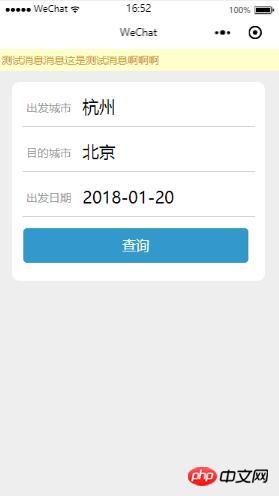
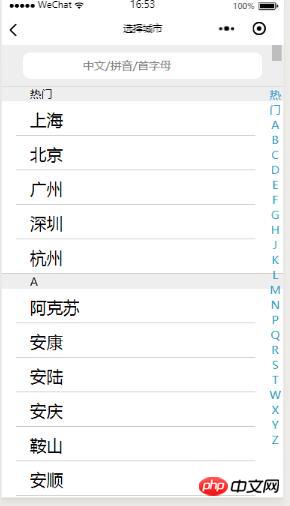
实现功能简介
-
城市的选择
-
按中文/拼音/首字母条件搜索
-
按首字字母快速定位到城市位置
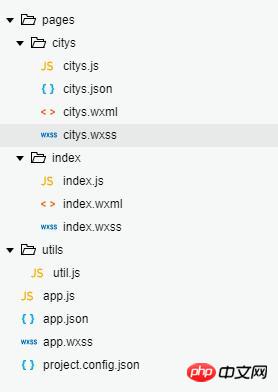
目录结构
主要代码
app.js
App({
 globalData: {
 trainBeginCity: '杭州',
 trainEndCity: '北京'
 }
})
登录后复制
app.json
{
 "pages":[
 "pages/index/index",
 "pages/citys/citys"
 ],
 "window":{
 "backgroundTextStyle":"light",
 "navigationBarBackgroundColor": "#fff",
 "navigationBarTitleText": "WeChat",
 "navigationBarTextStyle":"black",
 "enablePullDownRefresh": true
 }
}
登录后复制
index.wxml
<view>测试消息消息这是测试消息啊啊啊</view>
登录后复制 出发城市 目的城市 出发日期 {{date}} 查询
index.js
const app = getApp()

Page({
 data: {
 begin: '',
 end: '',
 date: null
 },

 formSubmit: function (e) {
 // console.log('form发生了submit事件,携带数据为:', e.detail.value)
 wx.navigateTo({
 url: '../trains/trains?beginCity=' + e.detail.value.beginCity + "&endCity=" + e.detail.value.endCity + "&leaveDate=" + e.detail.value.leaveDate,
 })
 },
 formReset: function () {
 console.log('form发生了reset事件')
 },
 bindDateChange: function (e) {
 this.setData({
 date: e.detail.value
 })
 },
 onLoad: function (options) {
 // wx.navigateTo({
 // url: '../citys/citys?cityType=begin',
 // })


 if (this.data.date == null || this.data.date.trim() == "") {
 var day = new Date()
 day.setTime(day.getTime() + 24 * 60 * 60 * 1000);
 var year = day.getFullYear(); //年
 var month = day.getMonth() + 1; //月
 var day = day.getDate();  //日

 if (month <p></p><p>index.wxss</p><p class="jb51code"></p><pre class="brush:css;toolbar:false;">.flex-box {
 display: flex;
 flex-direction: row;
 border-bottom: #CCCCCC solid 1px;
 margin: 28rpx;
 width: 600rpx;
 padding:10rpx;
 height: 70rpx;
}

.btn-area{
 margin: 30rpx;
 width: 600rpx;
}

.flex-box-header{
 width: 25%;
 font-size: 30rpx;
 margin-top: 10rpx;
 color: #999999;

 /* line-height: 60rpx; */
}

.flex-box-content{
 width: 70%;
 margin-top: 0rpx;
 font-size: 45rpx;
}
.flex-box-content-pricker{
 margin-top: 0rpx;
 width: 70%;
 font-size: 45rpx;
}

.form-content{
 margin-top:30rpx;
 display: flex;
 margin-left: 5%;
 width: 90%;
 background-color: #FFFFFF;
 border-radius: 20rpx;
 /* border: 3rpx solid #CCCCCC; */
 height: 530rpx;
}

.bus-view{
 display: flex;
 flex-direction: row;
 width: 700rpx;
 height: 100rpx;
 margin:20rpx;
 font-size: 30rpx;
 border-bottom: 1rpx solid #CCCCCC;
}

.bus-view-left{
 text-align: center;
 line-height: 100rpx;
 font-size: 30rpx;
 width: 200rpx;
 /* border-right: 1rpx solid #CCCCCC; */
}

.bus-view-right{
 width: 300rpx;
 display: flex;
 flex-direction: column;
 font-size: 28rpx;
 /* border: 1rpx solid #CCCCCC; */
}

.bus-view-right-item{
 text-align: center;
 margin: 5rpx;
}

.btn-query{
 background-color:#3399CC;
 color:#FFFFFF;
}


.input-city{
 /* border: 1rpx solid #CCCCCC; */
}
登录后复制
citys.wxml
<view>
<input></view><view>
<view>
<view>{{item.cityName}}</view>
</view></view><view>
<view>
<view> 1}}" class='city-item' data-cityname='{{item.cityName}}' bindtap='citySelected'>{{item.cityName}}</view>
<view>{{item.cityName}}</view>
<!-- <view data-cityname='{{item.cityName}}' bindtap='citySelected' >{{item.cityName}}</view> -->
</view></view>
登录后复制
citys.js
const app = getApp()

Page({
 /**
 * 生命周期函数--监听页面加载
 */
 onLoad: function (options) {
 this.setData({
 cityType: options.cityType
 })
 if (this.data.cityResults == null) {
 this.setData({
 cityResults: this.data.citys
 })
 }
 },
 bindAZ: function (e) {
 var currentCityName = e.currentTarget.dataset.id
 var that = this;
 //放入A-Z的scrollTop参数
 if (that.data.scrollAZ == null) {
 wx.createSelectorQuery().selectAll('.city-item-A-Z').fields({
 dataset: true,
 size: true,
 rect: true
 }, function (res) {
 res.forEach(function (re) {
  if (currentCityName == re.dataset.cityname) {
  wx.pageScrollTo({
  scrollTop: re.top + that.data.scrollNow - 55.5,
  duration: 0
  })
  }
 })
 }).exec();
 } else {
 this.data.scrollAZ.forEach(function (re) {
 if (currentCityName == re.dataset.cityname) {
  wx.pageScrollTo({
  scrollTop: re.top + that.data.scrollNow - 55.5,
  duration: 0
  })
 }
 })
 }


 },
 onPageScroll: function (e) { // 获取滚动条当前位置
 this.setData({
 scrollNow: e.scrollTop
 })
 },

 /**
 * 生命周期函数--监听页面初次渲染完成
 */
 onReady: function () {

 },
 citySelected: function (e) {
 var cityNameTemp = e.currentTarget.dataset.cityname

 if (this.data.cityType == 'begin') {
 app.globalData.trainBeginCity = cityNameTemp
 }

 if (this.data.cityType == "end") {
 app.globalData.trainEndCity = cityNameTemp
 }

 wx.navigateBack()
 },
 bindSarchInput: function (e) {
 wx.pageScrollTo({
 scrollTop: 0,
 duration: 0
 })

 var inputVal = e.detail.value;
 var cityResultsTemp = new Array()
 var citys = this.data.citys;

 if (inputVal == null || inputVal.trim() == '') {
 this.setData({
 cityResults: citys
 })
 return;
 }

 for (var i = 0; i <p></p><p>citys.wxss</p><p class="jb51code"></p><pre class="brush:css;toolbar:false;">.a-z{
 width: 35rpx;
 position: fixed;
 top: 112rpx;
 text-align: center;
 right: 5rpx;
 color: #3399CC;
 font-size: 30rpx;
 /* border: 1rpx solid #3399CC; */
}


.city-item-content {
 display: flex;
 flex-direction: column;
 justify-content: center;
 margin-top: 110rpx;
 background-color: #FFFFFF;
}

.city-item {
 background: #fff;
 /* margin-top: 5rpx; */
 width: 80%;
 padding-left: 5%;
 margin-left: 5%;
 height: 90rpx;
 font-size: 45rpx;
 line-height: 100rpx;
 border-bottom: 1rpx solid #CCCCCC;
 /* border:1rpx solid red; */
}

.city-item-A-Z{
 width: 100%;
 height: 40rpx;
 font-size: 30rpx;
 padding-left: 10%;
 background-color: #EEEEEE;
 border-top: 1rpx solid #CCCCCC;
 margin-top: -1rpx;
}


.search-box {
 top: 0;
 position: fixed;
 width: 100%;
 /* left:5%; */
 background: #eee;
 height: 110rpx;
 font-size: 30rpx;
 border-bottom:1rpx solid #DDDDDD;
 /* border: 1rpx solid red; */
}

.search-input {
 height: 70rpx;
 line-height: 60rpx;
 width: 80%;
 margin-left: 7.5%;
 border-radius: 20rpx;
 /* border: 1rpx solid red; */
 background: #fff;
 margin-top: 20rpx;
 padding-left: 5%;
}

.search-input-placeholder {
 text-align: center;
}
登录后复制
以上就是本文的全部内容,希望对大家的学习有所帮助,更多相关内容请关注PHP中文网!
相关推荐:
以上就是微信小程序实现城市列表的选择的详细内容,更多请关注米云其它相关文章!
