

小程序如何使用md5
1、下载MD5源文件(JS);
2、在小程序模块中使用require引入外部模块;也可以在app.js中直接全局引入md5.js文件。
因为源md5.js中没有对模块进行输出,如果使用require需要export,所以在md5.js中需要加入以下代码:
module.exports =  {
  hexMD5: hex_md5, //需要输出的加密算法,我这边只写了我需要得两种
  b64Md5: b64_md5,
}
登录后复制
在js文件中使用require引入md5:
推荐学习:
const md5 = require('../../assets/js/md5/md5.js');
登录后复制
使用:
let b64 = md5.b64Md5(code); //code需要加密的数据
登录后复制
下面是我的文件结构:
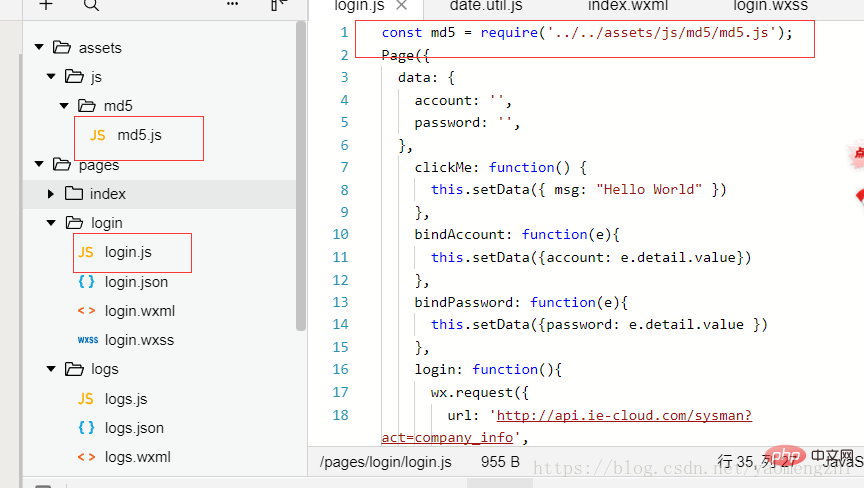
/*
 * A JavaScript implementation of the RSA Data Security, Inc. MD5 Message
 * Digest Algorithm, as defined in RFC 1321.
 * Version 2.1 Copyright (C) Paul Johnston 1999 - 2002.
 * Other contributors: Greg Holt, Andrew Kepert, Ydnar, Lostinet
 * Distributed under the BSD License
 * See http://pajhome.org.uk/crypt/md5 for more info.
 */

/*
 * Configurable variables. You may need to tweak these to be compatible with
 * the server-side, but the defaults work in most cases.
 */
var hexcase = 0;  /* hex output format. 0 - lowercase; 1 - uppercase        */
var b64pad  = ""; /* base-64 pad character. "=" for strict RFC compliance   */
var chrsz   = 8;  /* bits per input character. 8 - ASCII; 16 - Unicode      */

/*
 * These are the functions you'll usually want to call
 * They take string arguments and return either hex or base-64 encoded strings
 */
function hex_md5(s){ return binl2hex(core_md5(str2binl(s), s.length * chrsz));}
function b64_md5(s){ return binl2b64(core_md5(str2binl(s), s.length * chrsz));}
function str_md5(s){ return binl2str(core_md5(str2binl(s), s.length * chrsz));}
function hex_hmac_md5(key, data) { return binl2hex(core_hmac_md5(key, data)); }
function b64_hmac_md5(key, data) { return binl2b64(core_hmac_md5(key, data)); }
function str_hmac_md5(key, data) { return binl2str(core_hmac_md5(key, data)); }

/*
 * Perform a simple self-test to see if the VM is working
 */
function md5_vm_test()
{
  return hex_md5("abc") == "900150983cd24fb0d6963f7d28e17f72";
}

/*
 * Calculate the MD5 of an array of little-endian words, and a bit length
 */
function core_md5(x, len)
{
  /* append padding */
  x[len >> 5] |= 0x80 >> 9)  16) bkey = core_md5(bkey, key.length * chrsz);

  var ipad = Array(16), opad = Array(16);
  for(var i = 0; i > 16) + (y >> 16) + (lsw >> 16);
  return (msw >> (32 - cnt));
}

/*
 * Convert a string to an array of little-endian words
 * If chrsz is ASCII, characters >255 have their hi-byte silently ignored.
 */
function str2binl(str)
{
  var bin = Array();
  var mask = (1 >5] |= (str.charCodeAt(i / chrsz) & mask) >5] >>> (i % 32)) & mask);
  return str;
}

/*
 * Convert an array of little-endian words to a hex string.
 */
function binl2hex(binarray)
{
  var hex_tab = hexcase ? "0123456789ABCDEF" : "0123456789abcdef";
  var str = "";
  for(var i = 0; i >2] >> ((i%4)*8+4)) & 0xF) +
           hex_tab.charAt((binarray[i>>2] >> ((i%4)*8  )) & 0xF);
  }
  return str;
}

/*
 * Convert an array of little-endian words to a base-64 string
 */
function binl2b64(binarray)
{
  var tab = "ABCDEFGHIJKLMNOPQRSTUVWXYZabcdefghijklmnopqrstuvwxyz0123456789+/";
  var str = "";
  for(var i = 0; i > 2] >> 8 * ( i   %4)) & 0xFF) > 2] >> 8 * ((i+1)%4)) & 0xFF) > 2] >> 8 * ((i+2)%4)) & 0xFF);
    for(var j = 0; j  binarray.length * 32) str += b64pad;
      else str += tab.charAt((triplet >> 6*(3-j)) & 0x3F);
    }
  }
  return str;
}


module.exports =  {
  hexMD5: hex_md5,
  b64Md5: b64_md5,
}
登录后复制
以上就是小程序如何使用md5的详细内容,更多请关注米云其它相关文章!
