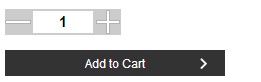
zencart的产品详细页面客户体验是非常不好,为此提供一个数量框加减的办法: 进入includes\templates\你的模板\templates\tpl_product_info_display.php 找到<!–bof Add to Cart Box –> 在前面加上脚本引用 <script type=”text/javascript” src=”http://ajax.googleapis.com/ajax/libs/jquery/1.6.2/jquery.min.js”></script> //如果网站已引用此库,可以将这一行删掉 <script> $(function(){ var t = $(“#text_box”); $(“#add”).click(function(){ t.val(parseInt(t.val())+1) if (parseInt(t.val())!=1){ $(‘#min’).attr(‘disabled’,false); } }) $(“#min”).click(function(){ t.val(parseInt(t.val())-1) if (parseInt(t.val())==1){ $(‘#min’).attr(‘disabled’,true); } if(parseInt(t.val())==0){ alert(“Quantity can not be less than 1 !”); t.val(parseInt(t.val())+1) } }) }) </script> 接着找到: // show the quantity box $the_button = PRODUCTS_ORDER_QTY_TEXT . ‘<input type=”text” name=”cart_quantity” value=”‘ . (zen_get_buy_now_qty($_GET[‘products_id’])) . ‘” maxlength=”6″ size=”4″ /><br />’ . zen_get_products_quantity_min_units_display((int)$_GET[‘products_id’]) . ‘<br />’ . zen_draw_hidden_field(‘products_id’, (int)$_GET[‘products_id’]) . zen_image_submit(BUTTON_IMAGE_IN_CART, BUTTON_IN_CART_ALT); } 替换成 // show the quantity box $the_button = ‘<input id=”min” name=”” type=”button” value=”-” /><input id=”text_box” style=”height:20px; font-size:15px; text-align:center; font-weight:bold;border: 2px solid #333333;” type=”text” name=”cart_quantity” value=”‘ . (zen_get_buy_now_qty($_GET[‘products_id’])) . ‘” maxlength=”6″ size=”4″ /><input id=”add” name=”” type=”button” value=”+” /><br />’ . zen_get_products_quantity_min_units_display((int)$_GET[‘products_id’]) . ‘<br />’ . zen_draw_hidden_field(‘products_id’, (int)$_GET[‘products_id’]) . zen_image_submit(BUTTON_IMAGE_IN_CART, BUTTON_IN_CART_ALT); } 下面是效果图:

美国服务器选米云 – FWQ.AI
