

一、介绍
作为一名运维,经常会部署各种用途的操作系统,但在这些工作中,我们会发现很多工作其实是重复性的劳动,操作的内容也是大同小异,基于这类情况,我们可以把相同的操作做成统一执行的脚本,不同的东西作为变量手动输入。节约下来的时间不就可以做更多有意义的事情吗?
最近在粉丝有推荐下发现一款比较好用的shell源码,也基于此改编了一下,分享给大家。
二、菜单
主菜单:
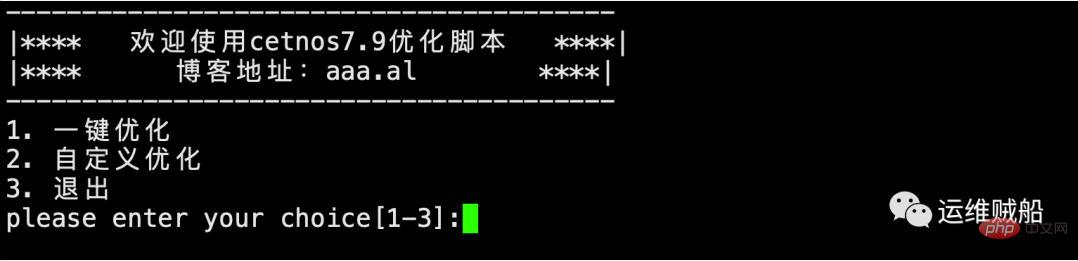
二级菜单:
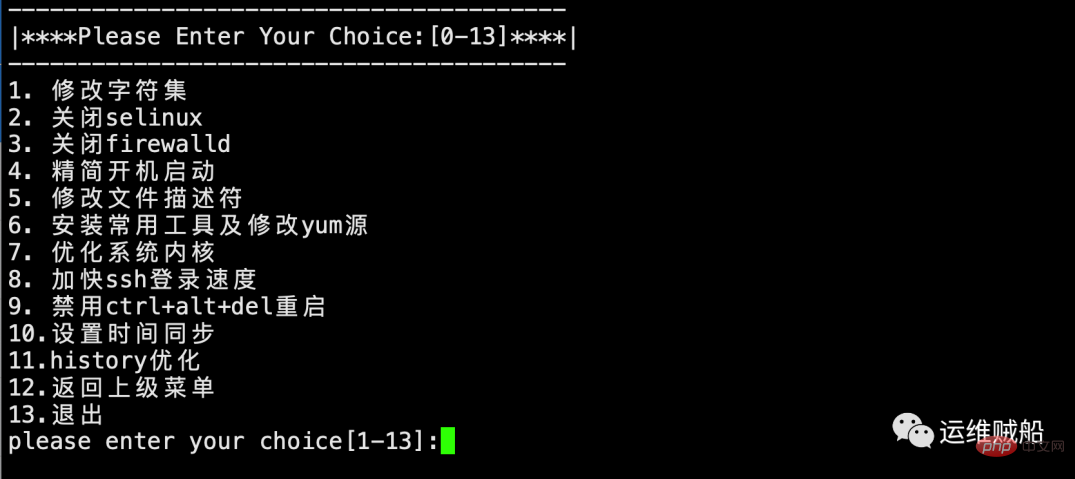
主要实现系统的各类优化,比如常用的修改字符集、关闭selinux、关闭防火墙、安装常用工具和加快ssh登录等功能。
牛逼啊!接私活必备的 N 个开源项目!赶快收藏吧
登录后复制
三、源码
#!/bin/sh
. /etc/rc.d/init.d/functions
export LANG=zh_CN.UTF-8
#一级菜单
menu1()
{
clear
cat /etc/locale.conf /dev/null
echo '#firewall-cmd --state'
firewall-cmd --state
systemctl disable firewalld.service &> /dev/null
echo '#systemctl list-unit-files | grep firewalld'
systemctl list-unit-files | grep firewalld
action "完成禁用firewalld,生产环境下建议启用!" /bin/true
echo "==========================================================="
sleep 5
}
#4.精简开机启动
chkset()
{
echo "=======================精简开机启动========================"
systemctl disable auditd.service
systemctl disable postfix.service
systemctl disable dbus-org.freedesktop.NetworkManager.service
echo '#systemctl list-unit-files | grep -E "auditd|postfix|dbus-org.freedesktop.NetworkManager"'
systemctl list-unit-files | grep -E "auditd|postfix|dbus-org.freedesktop.NetworkManager"
action "完成精简开机启动" /bin/true
echo "==========================================================="
sleep 2
}
#5.修改文件描述符
limitset()
{
echo "======================修改文件描述符======================="
echo '* - nofile 65535'>/etc/security/limits.conf
ulimit -SHn 65535
echo "#cat /etc/security/limits.conf"
cat /etc/security/limits.conf
echo "#ulimit -Sn ; ulimit -Hn"
ulimit -Sn ; ulimit -Hn
action "完成修改文件描述符" /bin/true
echo "==========================================================="
sleep 2
}
#6.安装常用工具及修改yum源
yumset()
{
echo "=================安装常用工具及修改yum源==================="
yum install wget -y &> /dev/null
if [ $? -eq 0 ];then
cd /etc/yum.repos.d/
cp CentOS-Base.repo CentOS-Base.repo.$(date +%F)
ping -c 1 mirrors.aliyun.com &> /dev/null
if [ $? -eq 0 ];then
wget -O /etc/yum.repos.d/CentOS-Base.repo http://mirrors.aliyun.com/repo/Centos-7.repo &> /dev/null
yum clean all &> /dev/null
yum makecache &> /dev/null
else
echo "无法连接网络"
exit $?
fi
else
echo "wget安装失败"
exit $?
fi
yum -y install ntpdate lsof net-tools telnet vim lrzsz tree nmap nc sysstat &> /dev/null
action "完成安装常用工具及修改yum源" /bin/true
echo "==========================================================="
sleep 2
}
#7. 优化系统内核 #另外,搜索公众号技术社区后台回复“壁纸”,获取一份惊喜礼包。kernelset()
{
echo "======================优化系统内核========================="
chk_nf=`cat /etc/sysctl.conf | grep conntrack |wc -l`
if [ $chk_nf -eq 0 ];then
cat >>/etc/sysctl.conf /dev/null
if [ $? -eq 0 ];then
/usr/sbin/ntpdate time.windows.com
echo "*/5 * * * * /usr/sbin/ntpdate ntp.aliyun.com &>/dev/null" >> /var/spool/cron/root
else
echo "ntpdate安装失败"
exit $?
fi
action "完成设置时间同步" /bin/true
echo "==========================================================="
sleep 2
}
#11. history优化
historyset()
{
echo "========================history优化========================"
chk_his=`cat /etc/profile | grep HISTTIMEFORMAT |wc -l`
if [ $chk_his -eq 0 ];then
cat >> /etc/profile <p style="margin: 1.5em 0px;padding: 0px;outline: 0px;max-width: 100%;box-sizing: border-box !important;word-wrap: break-word !important;clear: both;min-height: 1em;font-size: inherit;color: inherit;line-height: inherit;overflow-wrap: break-word !important;">将其保存为init.sh,然后赋予执行权限后执行即可。</p><pre class="brush:php;toolbar:false;">chmod +x init.sh && ./init.sh
登录后复制
如果这样来回地复制粘贴很麻烦,也可以通过我的一键命令执行,同样能达到上面的效果:
bash -c "$(curl -L s.aaa.al/init.sh)"
登录后复制
最后,如果大家有想实现的功能,也可以在原有脚本的基础上进行修改实现。
以上就是CentOS 7 系统优化脚本的详细内容,更多请关注FDCServers其它相关文章!
