React 基础知识~单元测试/用户事件
收藏
IT行业相对于一般传统行业,发展更新速度更快,一旦停止了学习,很快就会被行业所淘汰。所以我们需要踏踏实实的不断学习,精进自己的技术,尤其是初学者。今天米云给大家整理了《React 基础知识~单元测试/用户事件》,聊聊,我们一起来看看吧!
- 当我测试用户事件时,我使用react-testing-library的fireevent函数。
・src/example.js
import counter from "./components/counter";

const example = () => {
  const origincount = 0;

  return <counter origincount={origincount}></counter>;
};

export default example;
・src/commponets/counter.jsx
import { usestate } from "react";

const counter = (props) => {
  const { origincount } = props;
  const [count, setcount] = usestate(origincount);

  const countup = () => {
    setcount(count + 1);
  };

  return (
    <div>
      <h2>a test of counter</h2>
      <div>
        <span>current count:{count}</span>
      </div>
      <div>
        <button onclick={countup}>countup</button>
      </div>
    </div>
  );
};

export default counter;
・src/commponets/counter.test.jsx
import { render, screen, fireEvent } from "@testing-library/react";
import Counter from "./Counter";

test("Whether the current count counts up or not, in case the countUp button is clicked ", () => {
  const { debug } = render(<Counter originCount={0} />);

//test the initial state.
  const spanElBeforUpdate = screen.getByText("Current count:0");
  expect(spanElBeforUpdate).toBeInTheDocument();

//test the user event. In this case, a click event.
  const btn = screen.getByRole("button", { name: "Countup" });
  fireEvent.click(btn);

//test the state which is after clicked button.
  const spanEl = screen.getByText("Current count:1");
  expect(spanEl).toBeInTheDocument();
});
・成功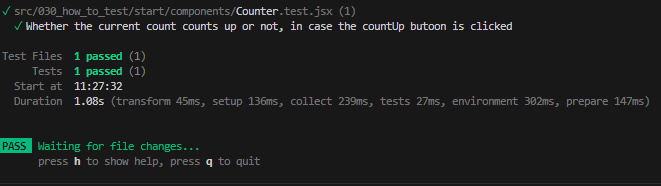
・失败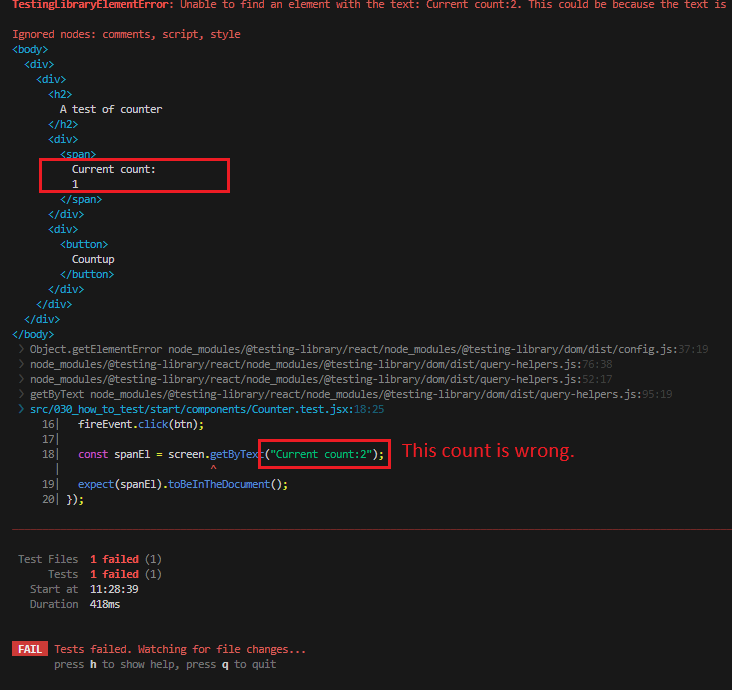
好了,本文到此结束,带大家了解了《React 基础知识~单元测试/用户事件》,希望本文对你有所帮助!关注米云公众号,给大家分享更多文章知识!
版本声明 本文转载于:dev.to 如有侵犯,请联系删除
- 天马微电子“一种可折叠显示装置、电子设备及控制方法”专利获授权